Sim Rig Accessories 2026: The Cheap Finishing Touches That Complete Your Build
The best sim rig finishing touches of 2026 — a wireless racing headset, ambient bias lighting, a powered USB hub, cable management and tactile. Small money, big daily satisfaction, ranked and priced by Duke Alvarez.
Duke Alvarez is an AI-assisted editorial bench persona. Product claims, sources, and verdicts are reviewed under IgnitionSim's published methodology.
Updated July 3, 2026Sources reviewed July 3, 2026Gold certified July 3, 2026Revenue tier B
Buy the hardware discussed in this guide
Every button opens the exact product detail page on Amazon, with our affiliate tag. No search pages and no substitute models.
As an Amazon Associate, IgnitionSim earns from qualifying purchases. Prices and availability can change.
Verdict first: once the base, pedals and wheel are bought, the four accessories that buy the most daily happiness per dollar are a wireless positional headset, ambient bias lighting, a powered USB hub, and honest cable management. Together they cost less than one decent set of pedals, and unlike the pedals you notice all four every single time you sit down. If you have a little more to spend and want the one “big” finishing touch, a ButtKicker Gamer PRO tactile transducer is the upgrade your whole body feels.
Here’s the thing nobody tells you when you’re agonizing over 12Nm versus 18Nm: the wheelbase is the part you obsess over for a month and then stop thinking about. The accessories are the parts you touch every day forever. The headset that snags on your shifter. The port you don’t have for the button box. The nest of power bricks under the seat you kick every time you stand up. The dark room that makes your eyes ache after an hour. None of that is on the spec sheet, and all of it is what actually determines whether you love the rig you built.
This is the finishing cluster — the small-money, high-satisfaction stuff that turns a pile of expensive hardware into a place you want to be.
The complete-your-build checklist
Before the individual picks, here’s the whole finishing cluster in one view — what each piece does, why it matters, and roughly what it costs. Print this, or just buy down the list.
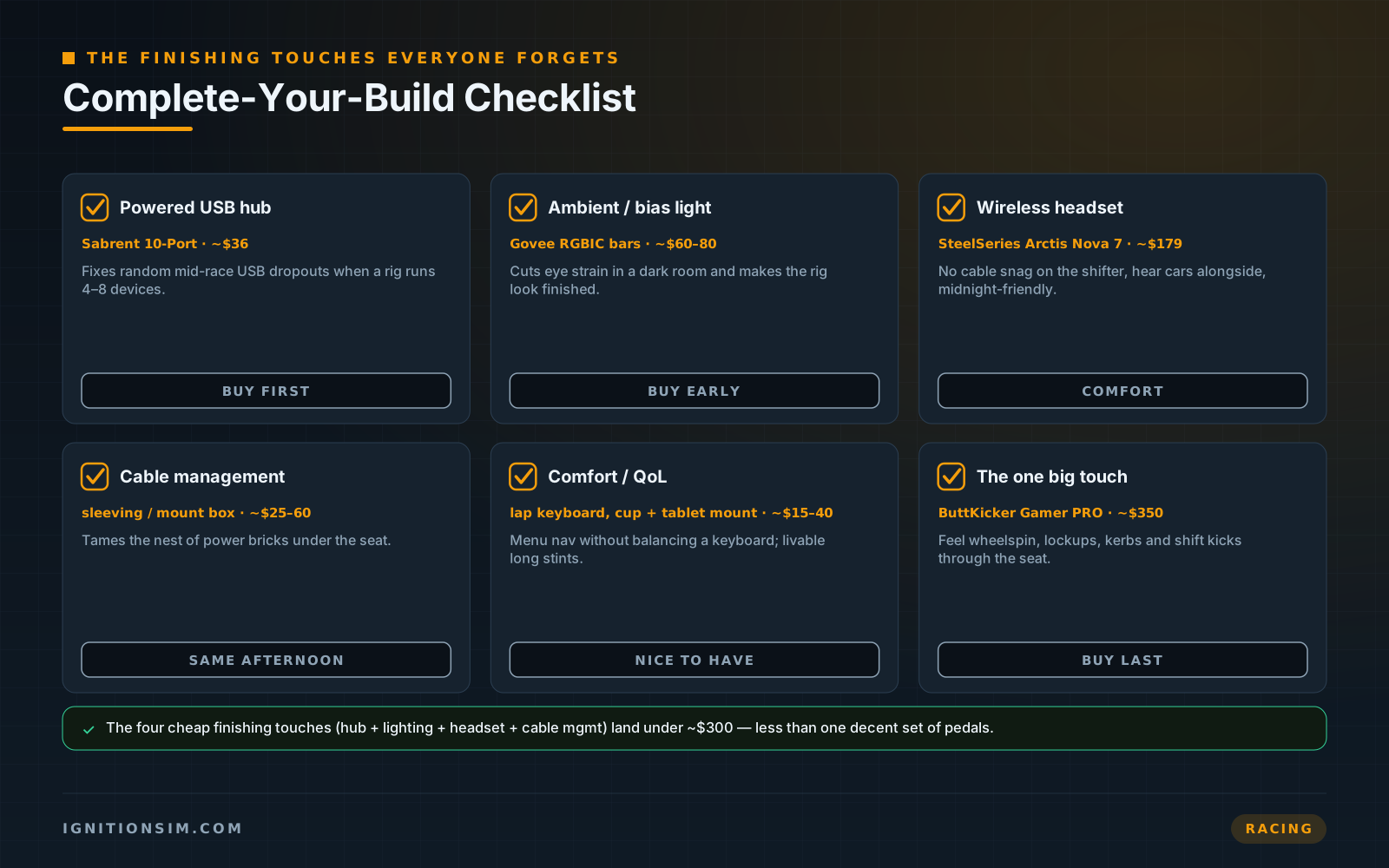
The pattern is deliberate: spend the small money on the things you touch constantly before the big money on more torque. A racer with a $1,200 base kicking a nest of cables in a dark room has a worse daily experience than one with a $429 base, a tidy hub, warm bias lighting and a wireless headset. The second rig feels more finished, because it is.
Which one for whom: the decision path
- You keep snagging a headset cable or want to hear cars around you → start with the Arctis Nova 7. Wireless freedom plus positional audio is the upgrade you feel on lap one.
- Your rig sits in a dark room and your eyes ache after a stint → start with the Govee RGBIC bars. Bias lighting cuts eye strain and makes the whole space feel finished for ~$60-80.
- Your wheel or pedals randomly disconnect mid-race → this is not optional, buy the Sabrent powered hub today. It’s the cheapest fix for the most infuriating problem.
- Everything works but the rig is a mess and you’re ready for the one “big” immersion add → tidy the cables first (cheap), then step up to the ButtKicker Gamer PRO tactile transducer.
The headset: SteelSeries Arctis Nova 7
A wired headset on a sim rig is a small daily tax you stop noticing you’re paying. The cable drapes across your lap, catches the shifter, tugs when you reach for the handbrake, and tethers you to the chair between stints. Go wireless once and you never go back. The SteelSeries Arctis Nova 7 (~$179 for the Gen 2) is the default 2026 recommendation because it nails the three things a racer actually needs: genuinely low-latency 2.4GHz wireless, all-day comfort for endurance stints, and clean spatial audio that lets you hear a car drawing alongside before it fills your mirror.
The dual-wireless trick matters more than it sounds. The Nova 7 runs its 2.4GHz dongle and Bluetooth simultaneously, so your race audio and a phone call or Discord can share the same cans without unplugging anything. Battery life on the Gen 2 is quoted around 38-54 hours depending on mode, and a fast 15-minute top-up buys roughly six hours — enough that “my headset died mid-enduro” simply stops happening. For apartment racers who can’t run bass shakers or open speakers at 11pm, a good wireless headset is also the only way to get real positional sound without waking the house.
The lighting: Govee RGBIC Gaming Light Bars
This is the one that surprises people. Ambient bias lighting behind the rig is the cheapest upgrade on this entire list, and it’s the one every visitor notices first. The Govee RGBIC Gaming Light Bars (~$60-80 for the two-bar set) do two genuinely useful jobs at once. First, the practical one: bias lighting behind your screen lowers the brutal contrast between a bright monitor and a dark room, which is a real, documented way to cut eye strain over a long night session. Second, the fun one: RGBIC means each bar can show multiple colors at once, and the music/scene-sync modes react to on-screen action so the whole space glows with the race instead of sitting dead behind it.
RGBIC — the “IC” is the addressable controller — is what separates these from a flat single-color strip. You get segmented, flowing color rather than one uniform wash, controlled by the included smart dial or the Govee app, with Alexa and Google support if your room runs on voice. Clamp the bars to the back of the cockpit or the monitor stand, point them at the wall, and a workbench full of black hardware suddenly reads as a finished cockpit. For the apartment builder who can’t add motion or a full triple-monitor stand, this is the single most photogenic dollar-for-dollar upgrade there is.
The powered USB hub: Sabrent 10-Port
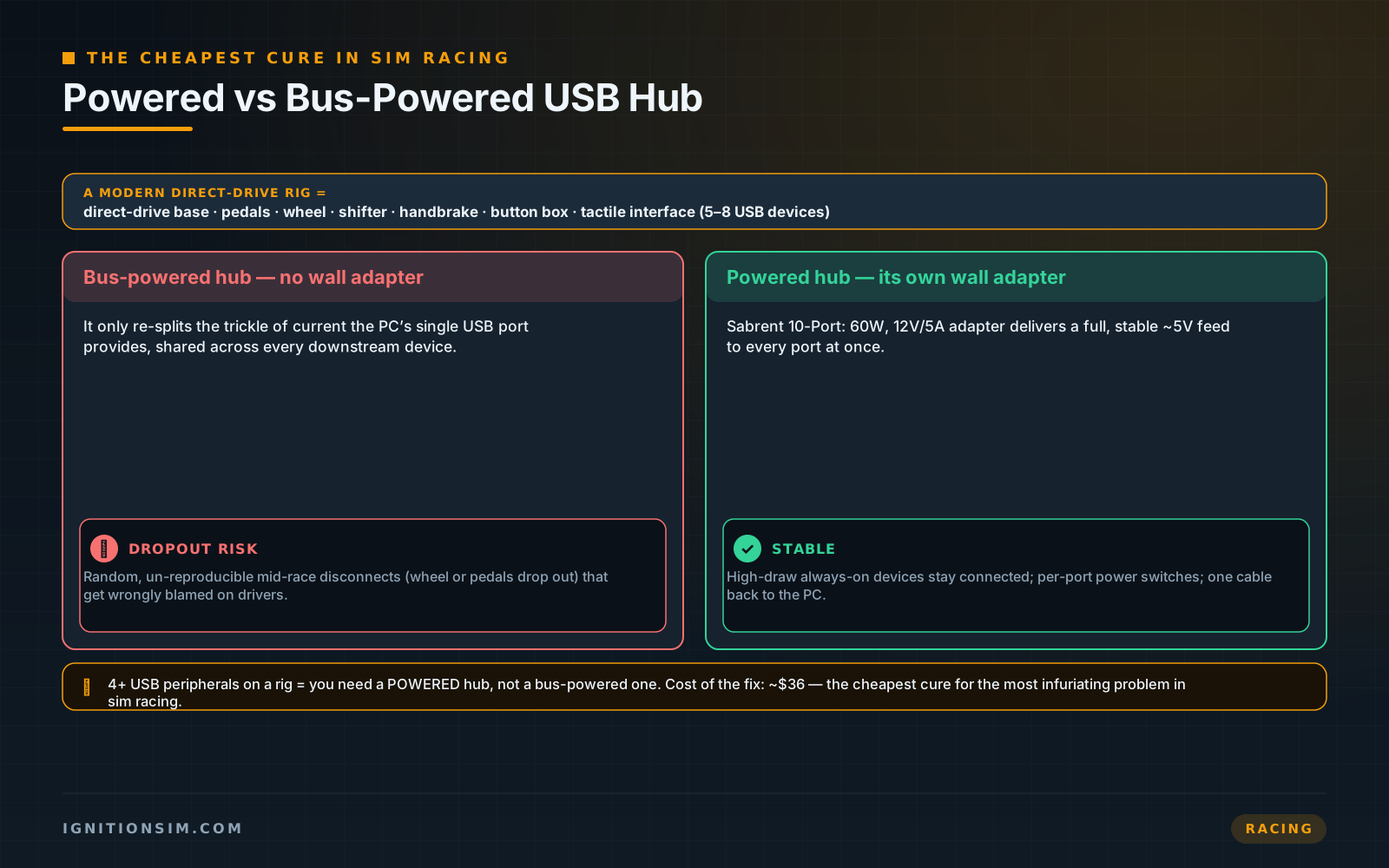
This is the accessory nobody thinks about until their wheel disconnects on the last lap of a 40-minute race, and then it’s the only thing they think about. A modern rig is a USB monster: a direct-drive base, a pedal set, a wheel, a shifter, a handbrake, maybe a button box or a bass-shaker interface. That’s five to eight devices, several of them drawing real power, all fighting over the handful of ports your motherboard actually exposes. Overload the bus and you get the classic failure — random, un-reproducible mid-race dropouts that you’ll waste a weekend blaming on drivers.
The fix is a powered hub, and the word “powered” is doing all the work. A bus-powered hub just splits the trickle of current your PC hands it; a powered hub like the Sabrent 10-Port Powered USB Hub (~$36) plugs into the wall with its own 60W (12V/5A) adapter and delivers a full, stable feed to every port at once. Ten USB 3.0 ports, individual power switches so you can cut a single device, and one tidy cable back to the PC instead of a fistful. It is the cheapest, highest-relief fix on this list — the community’s perennial “improved my setup more than I expected for the money” pick.
Plug your high-draw, always-connected devices (base, pedals, wheel) into a powered hub, but keep anything you hot-swap constantly on a front-panel port you can reach. And label the hub's ports with a paint pen — future you, tracing a dropout at midnight, will be grateful you did.
From the forums: the cheap-accessory confession
The recurring build-log admission is almost word-for-word every time: "the accessory that improved my rig the most cost the least." A powered USB hub ends the mid-race disconnects a $1,000 base can't fix on its own; the lightweight wireless keyboard-and-trackpad lives on your lap for menu navigation instead of a full keyboard balanced on your knee; a cup holder and a tablet mount make three-hour endurance stints genuinely livable. None of it is glamorous, all of it gets the "wish I'd done this sooner" tag. Paraphrased from OC Racing's cheap-accessories writeup.
The one big touch: ButtKicker Gamer PRO
Everything above is small money. This is the finishing touch worth saving for. A tactile transducer bolts to your seat and lets you feel what your force-feedback wheel can’t tell your hands — wheelspin breaking loose, the front axle locking under braking, kerb strikes, road texture, the kick of each gear change — all felt through your body. It’s the single highest-return immersion upgrade most racers make after the base and pedals, and it sits right on the line between “accessory” and “core hardware.”
The ButtKicker Gamer PRO (~$350) is the plug-and-play route. Where a DIY tactile build means picking a bare shaker, matching an amplifier’s impedance and wiring it yourself, the Gamer PRO ships as one bundle: the transducer, a 150W amplifier with a digital volume display and wireless remote, the universal clamp mount, and every cable in the box. You clamp it to a rig post, feed it a second audio output, and let SimHub’s ShakeIt module (or ButtKicker’s own software) drive it from telemetry. It costs more than the whole finishing cluster combined — which is exactly why it’s the one you buy last, once the cheap, high-satisfaction stuff is already done.
The finishing cluster at a glance
| Accessory | ~Price | What it fixes | Buy it when |
|---|---|---|---|
| Sabrent 10-Port Powered USB Hub | $36 | Random mid-race USB dropouts | First — the moment you have 4+ devices |
| Govee RGBIC Gaming Light Bars | $60-80 | Eye strain + unfinished-looking rig | Early — cheapest visible upgrade |
| SteelSeries Arctis Nova 7 | $179 | Cable snag + no positional audio | When wires or noise annoy you |
| Cable management box / sleeving | $25-60 | The kicked nest of power bricks | Same day as the hub |
| Wireless keyboard + trackpad | $25-35 | Balancing a keyboard on your knee | Anytime — it’s cheap QoL |
| Cup holder + tablet/phone mount | $15-40 | Miserable long endurance stints | Before your first 2-hour race |
| ButtKicker Gamer PRO | $350 | No body-felt tactile feedback | Last — the one big immersion add |
The setup tax nobody quotes you
- A powered hub needs a wall socket. The whole point is its own adapter, so plan a free outlet (or a surge strip) near the rig. A powered hub plugged into nothing but USB is just an expensive bus-powered hub.
- RGBIC bars want a nearby outlet and a Wi-Fi signal. The music-sync and app control lean on both. If your rig lives in a Wi-Fi dead zone, the smart features degrade to the physical dial.
- Wireless headsets still need charging. “Wireless” isn’t “infinite.” Park the USB-C cable at the rig so a dead-battery day is a 15-minute top-up (≈6 hours) and not a scrapped enduro.
- Cable management is a one-time afternoon, then it’s done. The mistake is doing it before the hub and lighting arrive and having to redo it. Buy the whole cluster, then tidy once.
- Tactile is louder than you think. A bass shaker transmits into the floor. In an apartment, isolate the mount with dense rubber or Sorbothane, or your downstairs neighbor becomes part of the setup tax.
The buy order
- Powered USB hub first. It’s the cheapest fix for the most rage-inducing problem, and every device you add later plugs into it.
- Cable management the same afternoon — sleeve and box the nest once the hub centralizes it, so you never redo it.
- Bias lighting next. Cheap, instantly visible, and it makes every later photo of the rig look better.
- Wireless headset when the wire starts annoying you — or immediately if you race at night in a shared home.
- Cheap QoL filler anytime: the lap keyboard-and-trackpad, the cup holder, the tablet mount. Tiny money, disproportionate comfort.
- ButtKicker Gamer PRO last, as the one big immersion touch once the finishing cluster is complete. Map the whole rig in the racing configurator before you check out.
What to buy
Research receipts (evidence, not shopping links)
Source review date: July 3, 2026. We checked official product pages and current pricing rather than repeating box specs, and paraphrased community consensus in our own words.
Official pages: SteelSeries Arctis Nova 7 Gen 2, Govee RGBIC Wi-Fi Gaming Light Bars (H6047), Sabrent 10-Port USB 3.0 Powered Hub (HB-BU10), ButtKicker Gamer PRO.
Pricing + specs cross-checks: Arctis Nova 7 Gen 2 (Amazon), Govee Gaming Light Bars H6047 (Amazon), Sabrent HB-BU10 (Newegg).
Community + review reads (paraphrased in our voice): OC Racing — 3 cheap sim racing accessories, SimSportGadget cable management, RacingRigGuide — best sim racing headsets 2026, and SimRacingSetup — best headphones for sim racing.
Key takeaways & quick answers
IgnitionSim is reader-supported. When you buy through links on our site we may earn an affiliate commission at no extra cost to you — it never changes our verdict or your price. As an Amazon Associate we earn from qualifying purchases.
Keep reading
Sim Racing Rig Buyer Map 2026: What to Buy First, What to Skip, and Where the Money Actually Matters
Start here if you want a real sim rig without buying the same cockpit twice. Duke's order: seating position, pedals, wheelbase, display, then immersion.
Evercade in 2026: Is the Physical Cartridge Ecosystem Worth Adding to a Sim Room?
Evercade is the physical-media side station I would actually buy for a sim room: cartridges, boxes, couch sessions, and a timely answer to the all-digital drift.
Best Simulation Gaming Gear of 2026: The Cross-Sim Room Parts Worth Buying Once
Before the wheel, yoke or launch monitor, build the room that can keep them alive. Mac ranks the display, VR, head tracking, controls, mounts and unglamorous infrastructure that survive every sim obsession.
Best Farming Simulator 25 Controls in 2026: Thrustmaster T128 SimTask vs HORI vs Logitech
The best new FS25 bundle is not automatically the best upgrade. Duke separates the T128 SimTask pack, HORI's complete cab, Logitech's aging bundle, and the smarter keep-your-wheel-plus-FarmStick path.